ChainLayerTwo

chainlayertwo / how it works

How ChainLayerTwo works.

The model it ships with, the providers it talks to, what a real run prints, how the pieces fit, the rules every run obeys, and the two ways to install it.

chainlayertwo localmodel setupthe built-in model

ChainLayerTwo 2B, the model that ships with the CLI.

A small model you run yourself, so the agent answers without an account, a key or a network. It is MiniCPM5-2B heretic-abliterated (2.5B parameters, Apache-2.0, a 128k-token context), set up with the ChainLayerTwo identity prompt and sampling settings. It runs through Ollama, and on a CPU if there is no GPU.

Guided, first runchainlayertwo localmodel setup
Just the modelchainlayertwo localmodel install

What setup does

  • 1. checks the machineGPU and VRAM (NVIDIA, AMD, Apple Silicon) or CPU only, free memory, and whether a local server is running.
  • 2. installs OllamaOr starts it. Only after you approve.
  • 3. picks the quantWith a GPU, the largest one that fits in VRAM with a 32k context. On a CPU, Q4_K_M, or Q3_K_M / Q2_K when memory is short.
  • 4. gets the weightsReuses a copy already in Ollama or a GGUF on disk; otherwise a resumable download from Hugging Face.
  • 5. tunes and checks itRegisters chainlayertwo-2b, sizes context and GPU layers as chainlayertwo-2b:cl-tuned, and runs one real tool-calling turn.
  • 6. makes it the defaultAfter showing the config diff. Re-run it any time.

Download size by quant

QuantSizePicked when
Q2_K1.0 GBCPU only, little free RAM
Q3_K_M1.3 GBCPU only, low RAM
Q4_K_M1.6 GBCPU only (the usual pick)
Q6_K, Q8_02.1, 2.7 GBGPU: the largest that fits
f165.0 GBGPU with room to spare

Eleven quants from 1.0 to 5.0 GB; the CLI picks for you. Weights come from mradermacher/MiniCPM5-2B-heretic-abliterated-GGUF.

  • /localmodel installThe same install from inside a session. /localmodel and --local prefer this model and mark it with ★.
  • /localmodel tuneRe-size a model’s context and GPU layers for this machine. /localmodel plan shows the plan without changing anything.
  • chainlayertwo --localStart a session on the best local model; CHAINLAYER_LOCAL=1 does the same.
Hosted models are down

The hosted gateway at chainlayertwo.online/v1 answers, but it has no working model backends right now, so nothing behind it completes a request. The installer still points a new CLI there, so run chainlayertwo localmodel setup after installing. When the gateway refuses, a session falls back to a running local model on its own and says so.

chainlayertwo updatewhat it does

Your own models, a controller that watches the run, and a fast CLI.

The parts you will use most. The full list of changes ships with the CLI in its changelog.

/localmodel

Local models, one command

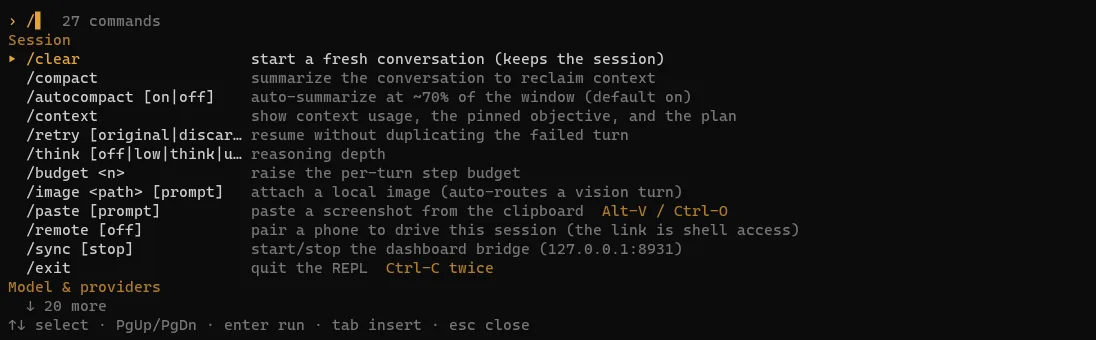
/localmodel (or /local) finds the models running on this machine under Ollama, llama.cpp or LM Studio and switches to the best one: a model that is already loaded first, then a coding model.

  • /localmodel hf coderSearch Hugging Face live for GGUF models.
  • /localmodel hf info <repo>The largest quant that fits your VRAM or RAM.
  • /localmodel pull <repo[:quant]>Download it. If Ollama refuses the hf.co redirect, the CLI fetches the file and imports it.
  • /localmodel installInstall the built-in ChainLayerTwo 2B, sized for this machine.
  • /localmodel tuneFit a model’s context and GPU layers to your memory; /localmodel plan only shows the plan. For llama.cpp it prints the llama-server flags.
  • chainlayertwo --localStart a session on the best local model.

Direct providers work without the gateway in between: Ollama, llama.cpp, LM Studio, DeepSeek, Kimi and Anthropic. Switch mid-session with /provider use and the conversation is kept.

chainlayertwo localmodel setup
  1. Checks the hardware and local serverMemory, and whether a local server is running.
  2. Installs or starts OllamaOnly with your approval.
  3. Picks a model that fitsSized to the memory it found.
  4. Downloads itThrough Ollama, or directly from Hugging Face.
  5. Verifies it with a real tool-calling turnOne turn that has to call a tool.
  6. Saves it as the defaultWith the config diff shown first. Re-run it any time.
/rcp

The RCP meta-controller

The Recursive Cyclic Perceptron runs over every agent run, whichever model is active. We call it “him”. He reads each step through a ternary cube, an eleven-node wheel and a nine-by-nine lattice, learns online from outcomes, and by default adds a short grounding note. He does not generate text.

In steer mode, which you turn on yourself, he can compact context and move along a model ladder. He always asks before switching to a paid provider and never bypasses the approval, policy or budget gates. Open the /rcp panel to watch him.

The RCP pipeline: a three-face cube feeds an eleven-node wheel, which feeds a nine by nine lattice.+−*Ω
3-face cube+ expansion, − contraction and * tension, meeting at the resolve vertex.
11-node wheelL, R and G quadrants, Ω synthesis at node 10 and the gate at node 11.
9×9 latticeThree scales (step, recent, session) by three channels (tools, model, context).
/play

It plays games

/play <window title> [goal] lets the agent play one game window: it reads screenshots of only that window, never the desktop, and presses keys and mouse buttons. Windows only, and offline or local games only.

Only you can allow a window, and terminals, shells, editors, browsers and chat apps can never be targets. Input goes to the game only while it is in front, Ctrl+Alt+End stops it at once, and a session is capped at 2 hours and 3000 actions.

chainlayertwo doctora captured run

This is what it prints.

A real session, reproduced verbatim: the launcher brings up the local stack, health-checks both gateways, then runs doctor. Nothing here was written for the website.

chainlayer2 --doctorexit 0
  ✓ Node v24.13.0  (recommended)
  ✓ OmniRoute service key resolved
  ✓ MCP bearer token resolved

  Bringing up the local ChainLayer stack…
  ● OmniRoute (model gateway) already running — http://localhost:20128/v1 (reusing)
    ✓ hardened: no-key → 401, service-key → 200
  ● ChainLayer2 MCP (tool gateway) already running — http://localhost:8930/mcp (reusing)
    ✓ /health → 200, /mcp no-token → 401 (bearer-gated)

  ✓ Local ChainLayer stack is up.

  ▶ chainlayer doctor   (composition health)
  ────────────────────────────────────────────────────────────
[PASS] omniroute.health        25ms  reachable at http://localhost:20128/v1 (HTTP 401)
[PASS] omniroute.auth          21ms  no key → 401, service key → 200
[PASS] omniroute.catalog       20ms  115 models (auto/best-coding, auto/best-reasoning, auto/best-fast, …)
[PASS] omniroute.completion  2384ms  auto/best-coding → "pong"
[PASS] mcp.health               2ms  http://localhost:8930/health → 200
[PASS] mcp.auth                 4ms  no token → 401, token → HTTP 200 (reaches init)
[PASS] mcp.initialize          15ms  initialized "chainlayer2-local" (http://localhost:8930/mcp)
[PASS] mcp.tools                0ms  12 tools (math_eval, math_simplify, math_derivative, math_solve, unit_convert, matrix_op, …)
[PASS] mcp.math_eval            3ms  math_eval(173 * 419) = 72487
[WARN] mcp.protocol_inspect     3ms  RE plane disabled / requires host binary (expected)
[WARN] unreal.availability      0ms  Unreal MCP not federated/reachable (expected in this deployment)

summary: 9 pass, 2 warn, 0 fail — OK (exit 0)

Captured on Windows 11 with Node v24.13.0 and NO_COLOR=1. Both services were already running, so the launcher reused them.

Why math_eval is the proof

173 × 419 = 72487 has no local shortcut. A correct answer means the call really crossed the MCP server the launcher had just checked.

Two warnings, on purpose

The reverse-engineering tools stay off until you set RE_ALLOWED_DIRS, and no Unreal MCP was connected. doctor exits 1 only on a real failure.

115 is a reading

The catalog count is what /v1/models returned on that machine. It moves with which providers are reachable.

So is the tool count

This capture predates the current MCP server, which registers 46 tools. tools/list on an endpoint is the only authority.

trace_idhow it fits together

Three planes on one chain, under one policy.

A task enters at the CLI, which mints one trace_id and carries it through every hop. The policy set at the top (sandbox, approval gate, budgets) is inherited by everything below it and never decided again.

chainlayertwo.online/v1, or 127.0.0.1:20128

OmniRoute, the model gateway

One OpenAI-compatible endpoint in front of many providers, with role routes such as auto/best-coding and provider fallback. It always needs a key.

127.0.0.1:8930/mcp, bearer

ChainLayer2 MCP, the tool gateway

One bearer-gated Model Context Protocol server with 46 tools for math, data, devtools, fetch and search, knowledge, re-grounding and authorized reverse engineering. The tool list

in the CLI

Parallel sub-agents

A journalled agent loop fans work out to 2 to 8 sandboxed sub-agents. Each inherits the same policy, all draw on one budget, and one fenced merger combines the results.

A separate control plane, the ChainLayer API, runs durable jobs on a crash-recoverable worker. It is deployed on its own and is not part of the one-line install.

--sandboxsafety by design

The guardrails are the product, not a setting.

No flag, mode or tool exists to weaken a safety control. The policy that governs one task governs every sub-agent it starts.

Sandbox and path confinement

A run's policy is frozen when it starts. --sandbox blocks writes and the shell, file tools stay in the working directory, and reverse-engineering tools stay inside allow-listed folders.

Approval that fails closed

Parallel runs use an approval gate with no interactive path: a request it cannot approve is rejected. No prompts pile up from sub-agents, and nothing is silently allowed.

Fan-out is one level deep

Sub-agents inherit the parent's policy and lose spawn_agents, so they cannot start agents of their own.

One shared budget

A task defaults to 200 steps and 500 tool calls, and --deadline adds a hard stop. Four sub-agents share one budget; they cannot spend four times as much.

Trusted models by default

The CLI classifies every backend before using it. Providers tiered experimental or anonymous are refused unless your policy names them.

Fenced writes, checked tokens

A superseded worker's write updates nothing and gets a typed stale_fence. Every MCP request is bearer-checked before dispatch; a missing or wrong token is always 401.

The objective is never dropped

Context fitting pins your original request and the latest summary. Long tool output is trimmed with a marker, and the conversation compacts at 70% of the window.

Turns survive a crash

Progress is written to a journal as the turn runs. After a crash or a closed terminal, the next launch offers /retry to resume it.

install.ps1, install.shinstall and update

One line. Then read what it tells you.

In a terminal the installer asks one question, Client or Host, and then prints the path it took and why. The answers give you different things, so the difference is worth a minute. The commands are on the download section.

Client

answer 1, the default

The CLI on its own. Also what CHAINLAYERTWO_CLI_ONLY=1 forces.

  • The chainlayertwo command on your PATH
  • No account needed: the installer writes a shared public key into your config
  • About twenty seconds; nothing is cloned or compiled
  • No model that answers yet. The config points at the hosted gateway, https://chainlayertwo.online/v1, which has no working model backends right now. Run chainlayertwo localmodel setup next
  • No MCP tools. Add them with the full stack, or point mcpServers at an endpoint you hold a token for

With no terminal to ask (CHAINLAYERTWO_NONINTERACTIVE=1, as /update sets), a machine with git and npm also gets the local MCP tool gateway, about 50 MB.

Host (full stack)

answer 2, opt in

A local model gateway and the tool gateway on this machine. Pick 2 at the prompt, or ask for it up front:

$env:CHAINLAYERTWO_FULL='1'; irm https://chainlayertwo.online/install.ps1 | iex
  • OmniRoute on 127.0.0.1:20128, started with REQUIRE_API_KEY=true, seeded with your local and keyed providers
  • ChainLayer2 MCP on 127.0.0.1:8930, with a bearer token minted on this machine
  • Both gateways health-checked before the installer reports success
  • Needs git, npm and a ChainLayer checkout; the first build takes 1 to 3 minutes

Commands to start with

  • chainlayertwo localmodel setupFirst: install ChainLayerTwo 2B (or another model that fits) and make it the default.
  • chainlayertwoThe interactive session.
  • chainlayertwo "add tests to ./src"A one-shot task in the current folder.
  • chainlayertwo doctorA health report for every stage.
  • chainlayertwo --sandbox "…"Read-only: every tool that changes something is blocked.
  • chainlayertwo --deadline 5m "…"A hard stop on top of the step and tool budget.
  • /remotePair a phone to drive this session through the remote page.
install.ps1, CLI-only path (abridged)
> irm https://chainlayertwo.online/install.ps1 | iex

  ✓ Node v24.13.0

  Which install is this?
    [1] Client (recommended)
    [2] Host    - also runs a local model gateway
  [1/2]: 1
  Path: CLI-ONLY
    reason: you asked for it

  Fetching release manifest …
  ✓ chainlayertwo 0.11.0
  Downloading CLI bundle …
  ✓ Verified SHA-256 f04fd9a049300092…
  ✓ Installed chainlayertwo 0.11.0
  ✓ Config written (baseUrl: https://chainlayertwo.online/v1)

  ChainLayerTwo 0.11.0 is installed and verified.

  TOOLS ARE NOT AVAILABLE on this install.
    no MCP tool server is configured, so file/shell tools are off.
The hash prefix and version are written from version.json when a release is built. Next: chainlayertwo localmodel setup.

chainlayertwo loginaccounts, optional

An account is optional. The CLI signs in from the terminal.

The CLI works without signing in, and so do local models. An account gives you your own daily quota and self-serve gateway keys: one on a free account, up to five on a privileged one. There is no password field in the CLI; chainlayertwo login uses a device code you approve in the browser.

  1. Run chainlayertwo loginThe CLI asks the account service for a short code and prints it.
  2. Approve it in the browserThe CLI opens the approval page. Sign in or create the account there, then approve the code you were shown.
  3. The CLI polls until you decideEvery five seconds. Deny, and it stops; wait fifteen minutes, and the code expires.
  4. One token, issued onceApproval mints a bearer token and burns the code in the same step. It is saved to ~/.chainlayer/credentials.json on your machine.
What the account service keeps

Only the SHA-256 of each device code, never the code itself. New accounts start as pending: they can sign in and approve devices straight away, and the gateway answers them once an admin approves.

Afterwards: chainlayertwo whoami, chainlayertwo logout. Compare the access tiers.

roadmapshipped and planned

Two agents the platform was built to carry.

One of them ships today; the other is planned. They are here so you can tell what the product does from what it is aimed at.

shipped

Game-playing agent

Shipped as /play: it reads screenshots of one game window, plans toward the goal you give it, and acts through keys and the mouse, with a fast local reflex loop for fights. Windows only, offline or local games only, always under a time and action budget.

planned

Reverse-engineering and coding agent

Would identify, disassemble and decompile an authorized target, inspect its wire format, then write the interop shim or test. The agent is planned; its guardrails already ship in the MCP server: an authorized: true attestation on every RE tool, RE_ALLOWED_DIRS, a denylist no flag overrides, and an audit log of every call.